Love Heart Particles
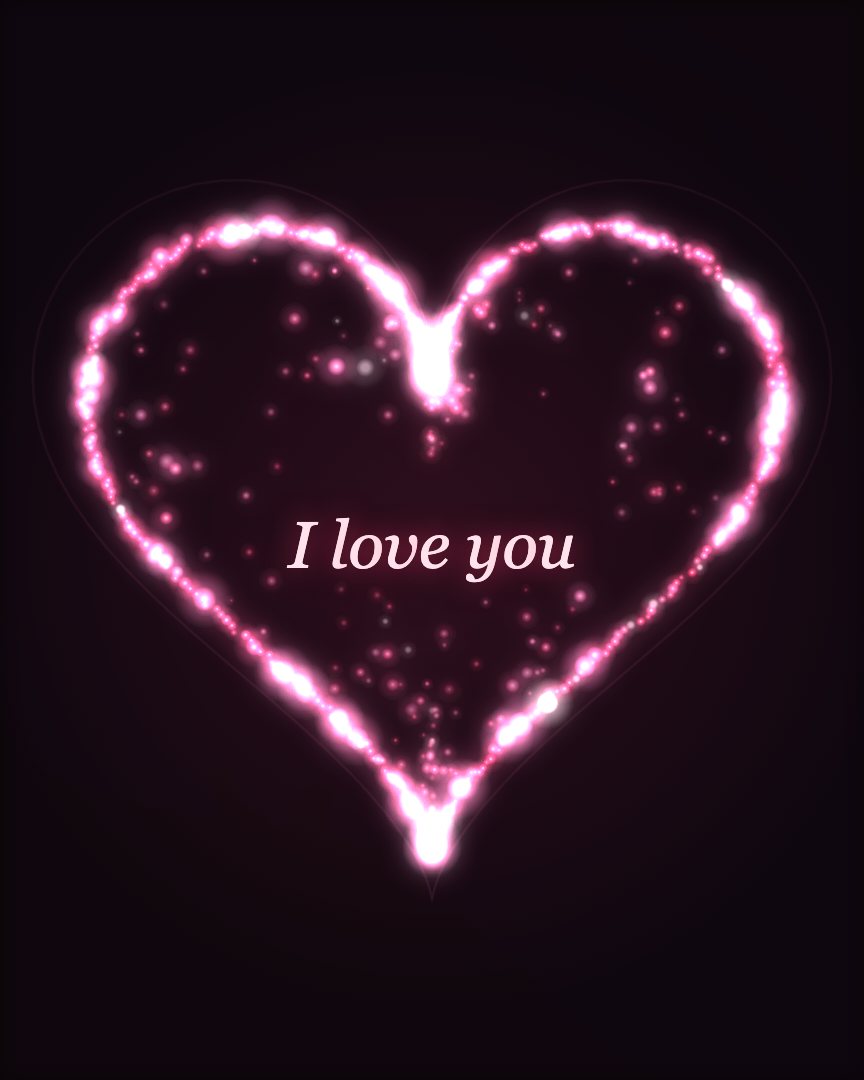
Type a name and press the heart. The letters burst into 420 particles that build a beating heart from the classic heart formula.
- Particles & fun
- Free
- canvas
- particles
- Added Sep 14, 2026
<style>
.love { position: relative; width: min(440px, 94vw); aspect-ratio: 440 / 460; }
.love canvas { position: absolute; inset: 0; width: 100%; height: 100%; }
.love form { position: absolute; left: 0; right: 0; bottom: 0; display: flex; gap: 10px; align-items: end; }
.love label { min-width: 0; }
.love input { width: 100%; box-sizing: border-box; }
.love label { flex: 1; display: grid; gap: 8px; color: #B59AA8; font-size: 13px; font-weight: 600; }
.love input { height: 46px; padding: 0 16px; border-radius: 12px; outline: none; border: 1px solid rgba(255,77,141,.5); background: #160B11; color: #FFE9F1; font: 700 26px Menlo, monospace; }
.love button { width: 84px; height: 46px; border: 0; border-radius: 12px; background: #FF2E6E; color: #fff; font-size: 20px; cursor: pointer;
  transition: transform .16s cubic-bezier(.23, 1, .32, 1); }
.love button:active { transform: scale(.95); }
</style>

<div class="love">
  <canvas></canvas>
  <form novalidate>
    <label>Send love to <input value="you" maxlength="12"></label>
    <button type="submit" aria-label="Send">♥</button>
  </form>
</div>

<script>
const COUNT = 420, BEAT = 0.8;
const heart = a => [
  16 * Math.sin(a) ** 3,
  -(13 * Math.cos(a) - 5 * Math.cos(2 * a)
    - 2 * Math.cos(3 * a) - Math.cos(4 * a)),
];

const box = document.querySelector('.love');
const canvas = box.querySelector('canvas'), ctx = canvas.getContext('2d');
const input = box.querySelector('input');
const reduce = matchMedia('(prefers-reduced-motion: reduce)').matches;
const COLORS = ['#FF4D8D', '#FF7AB0', '#FFC2D9', '#FF2E6E', '#FFFFFF'];
const ease = k => (k = Math.min(1, Math.max(0, k)), k < .5 ? 4 * k * k * k : 1 - Math.pow(-2 * k + 2, 3) / 2);

// two quick bumps per beat, like a real heartbeat
const beat = x => Math.exp(-(((x - .06) / .07) ** 2)) + .55 * Math.exp(-(((x - .28) / .08) ** 2));
const pulse = t => 1 + 0.08 * beat(t % BEAT);

let particles = [], born = 0;

function textPoints(text) {                                 // where the typed letters are, as pixels
  const r = input.getBoundingClientRect(), b = box.getBoundingClientRect();
  const c = document.createElement('canvas'); c.width = r.width; c.height = r.height; const x = c.getContext('2d');
  x.font = getComputedStyle(input).font; x.fillStyle = '#fff'; x.textBaseline = 'middle'; x.fillText(text, 16, r.height / 2);
  const d = x.getImageData(0, 0, c.width, c.height).data, pts = [];
  for (let y = 0; y < c.height; y += 2) for (let xx = 0; xx < c.width; xx += 2) if (d[(y * c.width + xx) * 4 + 3] > 128) pts.push([r.left - b.left + xx, r.top - b.top + y]);
  return pts.length ? pts : [[r.left - b.left + 30, r.top - b.top + 20]];
}

function makeParticle(i, start) {
  return {
    i, start, delay: Math.random() * .35, bend: [(Math.random() - .5) * 220, 60 + Math.random() * 120],
    inner: i % 10 < 3 ? .35 + .55 * Math.random() : .96 + .04 * Math.random(),
    color: COLORS[i % COLORS.length],
    flyTo([hx, hy]) { this.target = [hx, hy]; },
  };
}

function send(e) {
  e.preventDefault();
  const pts = textPoints(input.value || 'you');
  particles = Array.from({ length: COUNT }, (_, i) => makeParticle(i, pts[Math.floor(Math.random() * pts.length)]));
  particles.forEach((p, i) =>
    p.flyTo(heart(i / COUNT * Math.PI * 2)));
  born = performance.now(); input.style.color = 'transparent';
}
box.querySelector('form').addEventListener('submit', send);
input.addEventListener('input', () => { input.style.color = ''; });

function frame(now) {
  const w = box.clientWidth, h = box.clientHeight, dpr = devicePixelRatio;
  if (canvas.width !== w * dpr) { canvas.width = w * dpr; canvas.height = h * dpr; }
  ctx.setTransform(dpr, 0, 0, dpr, 0, 0); ctx.clearRect(0, 0, w, h);
  const s = (now - born) / 1000, cx = w / 2, cy = h * .4, size = w / 46, beatK = pulse(Math.max(0, s - 1));
  ctx.globalCompositeOperation = 'lighter';
  for (const p of particles) {
    const k = reduce ? 1 : ease((s - p.delay) / .9);
    if (k <= 0) continue;
    const tx = cx + p.target[0] * size * p.inner * beatK, ty = cy + p.target[1] * size * p.inner * beatK;
    const [sx, sy] = p.start, mx = (sx + tx) / 2 + p.bend[0], my = Math.min(sy, ty) - p.bend[1];
    const x = (1 - k) ** 2 * sx + 2 * (1 - k) * k * mx + k * k * tx + (k >= 1 ? Math.sin(now / 330 + p.i) * .8 : 0);
    const y = (1 - k) ** 2 * sy + 2 * (1 - k) * k * my + k * k * ty;
    ctx.fillStyle = p.color; ctx.beginPath(); ctx.arc(x, y, p.i % 7 ? 1.9 : 2.8, 0, 7); ctx.fill();
  }
  ctx.globalCompositeOperation = 'source-over';
  requestAnimationFrame(frame);
}
requestAnimationFrame(frame);
</script>
Type a name and press the heart button.
What you can change
Change a number, save, and reload the page to see the difference.
COUNT420How many particles build the heart.
BEAT0.8Seconds per heartbeat.
0.08in pulseHow much the heart grows on each beat.
Add it to your site
Put it on a landing page, a gift card or a thank you screen.
CSS
Paste into your stylesheet, or inside a <style> tag in <head>.
.love { position: relative; width: min(440px, 94vw); aspect-ratio: 440 / 460; }
.love canvas { position: absolute; inset: 0; width: 100%; height: 100%; }
.love form { position: absolute; left: 0; right: 0; bottom: 0; display: flex; gap: 10px; align-items: end; }
.love label { min-width: 0; }
.love input { width: 100%; box-sizing: border-box; }
.love label { flex: 1; display: grid; gap: 8px; color: #B59AA8; font-size: 13px; font-weight: 600; }
.love input { height: 46px; padding: 0 16px; border-radius: 12px; outline: none; border: 1px solid rgba(255,77,141,.5); background: #160B11; color: #FFE9F1; font: 700 26px Menlo, monospace; }
.love button { width: 84px; height: 46px; border: 0; border-radius: 12px; background: #FF2E6E; color: #fff; font-size: 20px; cursor: pointer;
  transition: transform .16s cubic-bezier(.23, 1, .32, 1); }
.love button:active { transform: scale(.95); }
HTML
Put it where the effect should appear on your page.
<div class="love">
  <canvas></canvas>
  <form novalidate>
    <label>Send love to <input value="you" maxlength="12"></label>
    <button type="submit" aria-label="Send">♥</button>
  </form>
</div>
JavaScript
Paste right before the closing </body> tag, inside <script></script>.
const COUNT = 420, BEAT = 0.8;
const heart = a => [
  16 * Math.sin(a) ** 3,
  -(13 * Math.cos(a) - 5 * Math.cos(2 * a)
    - 2 * Math.cos(3 * a) - Math.cos(4 * a)),
];

const box = document.querySelector('.love');
const canvas = box.querySelector('canvas'), ctx = canvas.getContext('2d');
const input = box.querySelector('input');
const reduce = matchMedia('(prefers-reduced-motion: reduce)').matches;
const COLORS = ['#FF4D8D', '#FF7AB0', '#FFC2D9', '#FF2E6E', '#FFFFFF'];
const ease = k => (k = Math.min(1, Math.max(0, k)), k < .5 ? 4 * k * k * k : 1 - Math.pow(-2 * k + 2, 3) / 2);

// two quick bumps per beat, like a real heartbeat
const beat = x => Math.exp(-(((x - .06) / .07) ** 2)) + .55 * Math.exp(-(((x - .28) / .08) ** 2));
const pulse = t => 1 + 0.08 * beat(t % BEAT);

let particles = [], born = 0;

function textPoints(text) {                                 // where the typed letters are, as pixels
  const r = input.getBoundingClientRect(), b = box.getBoundingClientRect();
  const c = document.createElement('canvas'); c.width = r.width; c.height = r.height; const x = c.getContext('2d');
  x.font = getComputedStyle(input).font; x.fillStyle = '#fff'; x.textBaseline = 'middle'; x.fillText(text, 16, r.height / 2);
  const d = x.getImageData(0, 0, c.width, c.height).data, pts = [];
  for (let y = 0; y < c.height; y += 2) for (let xx = 0; xx < c.width; xx += 2) if (d[(y * c.width + xx) * 4 + 3] > 128) pts.push([r.left - b.left + xx, r.top - b.top + y]);
  return pts.length ? pts : [[r.left - b.left + 30, r.top - b.top + 20]];
}

function makeParticle(i, start) {
  return {
    i, start, delay: Math.random() * .35, bend: [(Math.random() - .5) * 220, 60 + Math.random() * 120],
    inner: i % 10 < 3 ? .35 + .55 * Math.random() : .96 + .04 * Math.random(),
    color: COLORS[i % COLORS.length],
    flyTo([hx, hy]) { this.target = [hx, hy]; },
  };
}

function send(e) {
  e.preventDefault();
  const pts = textPoints(input.value || 'you');
  particles = Array.from({ length: COUNT }, (_, i) => makeParticle(i, pts[Math.floor(Math.random() * pts.length)]));
  particles.forEach((p, i) =>
    p.flyTo(heart(i / COUNT * Math.PI * 2)));
  born = performance.now(); input.style.color = 'transparent';
}
box.querySelector('form').addEventListener('submit', send);
input.addEventListener('input', () => { input.style.color = ''; });

function frame(now) {
  const w = box.clientWidth, h = box.clientHeight, dpr = devicePixelRatio;
  if (canvas.width !== w * dpr) { canvas.width = w * dpr; canvas.height = h * dpr; }
  ctx.setTransform(dpr, 0, 0, dpr, 0, 0); ctx.clearRect(0, 0, w, h);
  const s = (now - born) / 1000, cx = w / 2, cy = h * .4, size = w / 46, beatK = pulse(Math.max(0, s - 1));
  ctx.globalCompositeOperation = 'lighter';
  for (const p of particles) {
    const k = reduce ? 1 : ease((s - p.delay) / .9);
    if (k <= 0) continue;
    const tx = cx + p.target[0] * size * p.inner * beatK, ty = cy + p.target[1] * size * p.inner * beatK;
    const [sx, sy] = p.start, mx = (sx + tx) / 2 + p.bend[0], my = Math.min(sy, ty) - p.bend[1];
    const x = (1 - k) ** 2 * sx + 2 * (1 - k) * k * mx + k * k * tx + (k >= 1 ? Math.sin(now / 330 + p.i) * .8 : 0);
    const y = (1 - k) ** 2 * sy + 2 * (1 - k) * k * my + k * k * ty;
    ctx.fillStyle = p.color; ctx.beginPath(); ctx.arc(x, y, p.i % 7 ? 1.9 : 2.8, 0, 7); ctx.fill();
  }
  ctx.globalCompositeOperation = 'source-over';
  requestAnimationFrame(frame);
}
requestAnimationFrame(frame);
Good to know
- heart() is the parametric heart curve: x = 16 sin³t, y = 13 cos t − 5 cos 2t − 2 cos 3t − cos 4t.
Tilda, Webflow, WordPress
Press Copy all code at the top and paste it into one HTML block.
Add block, Other, T123 HTML code. Paste and save. Check the published page, the editor preview does not run scripts.
Add panel, Embed. Paste, then Save & Close. Custom code runs on the published site.
Add block, Custom HTML. Paste and press Update.