Автоподстановка кода из SMS
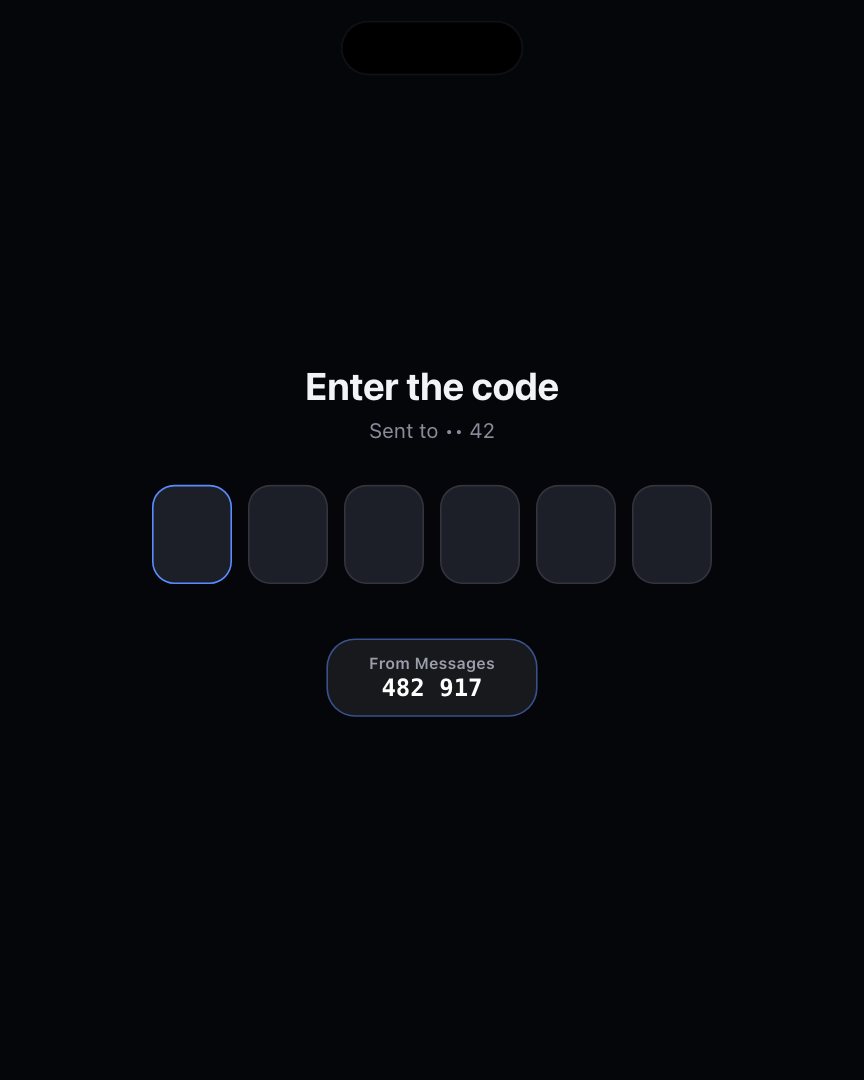
Поле для кода из SMS с шестью ячейками, в котором работает автоподстановка на iPhone, потому что под ячейками только одно настоящее поле ввода.
- Коды и PIN
- Бесплатно
- spring
- Добавлен 16 сентября 2026
<style>
:root {
  --ink: #0E1116; --slate: #5B6472; --line: #D8DDE5; --cobalt: #2E5BFF; --danger: #E5484D;
  --digits: 6;            /* number of cells, change together with maxlength */
  --cell: 48px; --gap: 10px; --h: 58px;
}
.card {
  box-sizing: border-box; width: min(420px, 92vw); padding: 30px 28px 34px; border-radius: 26px; background: #fff; text-align: center;
  box-shadow: 0 0 0 1px rgba(20,32,56,.06), 0 2px 6px rgba(30,45,70,.06), 0 26px 60px -26px rgba(30,45,70,.32);
}
h1 { margin: 0; font-size: 22px; letter-spacing: -.02em; }
p  { margin: 6px 0 24px; font-size: 14px; color: var(--slate); }

.otp { position: relative; width: calc(var(--cell) * var(--digits) + var(--gap) * (var(--digits) - 1)); height: var(--h); margin: 0 auto; }

/* the only real input, transparent, sits on top of the cells */
.otp input {
  position: absolute; inset: 0; width: 100%; height: 100%; z-index: 2;
  border: 0; outline: 0; background: transparent; color: transparent; caret-color: transparent;
  font-size: 16px; /* below 16px iOS zooms the page */
}

.cells { position: absolute; inset: 0; display: flex; gap: var(--gap); transition: gap .45s cubic-bezier(.6,0,.2,1); }
.cell {
  flex: 1; display: grid; place-items: center; border: 1.5px solid var(--line); border-radius: 12px; background: #fff;
  font-size: 25px; font-weight: 600; transition: border-color .15s, box-shadow .15s, border-radius .45s, transform .2s;
}
.cell.filled { animation: land .26s ease-out; }
@keyframes land { 50% { transform: scale(1.07); } }
.otp:focus-within .cell.active { border-color: var(--cobalt); box-shadow: 0 0 0 4px rgba(46,91,255,.14); }
.otp:focus-within .cell.active:empty::after {
  content: ""; width: 2px; height: 24px; border-radius: 1px; background: var(--cobalt); animation: blink 1s steps(1) infinite;
}
@keyframes blink { 50% { opacity: 0; } }

/* cells merge into a pill */
.otp[data-state="checking"] .cells, .otp[data-state="done"] .cells { gap: 0; }
.otp[data-state="checking"] .cell, .otp[data-state="done"] .cell { border-radius: 0; border-left-color: transparent; border-right-color: transparent; }
.otp[data-state="checking"] .cell:first-child, .otp[data-state="done"] .cell:first-child { border-radius: 29px 0 0 29px; border-left-color: var(--line); }
.otp[data-state="checking"] .cell:last-child,  .otp[data-state="done"] .cell:last-child  { border-radius: 0 29px 29px 0; border-right-color: var(--line); }
.otp[data-state="checking"] input, .otp[data-state="done"] input { pointer-events: none; }

.pill {
  position: absolute; inset: 0; border-radius: 29px; z-index: 3; display: flex; align-items: center; justify-content: center; gap: 8px;
  color: #fff; font-size: 18px; font-weight: 650; background: linear-gradient(180deg, #4A74FF, #2A55F5);
  box-shadow: inset 0 1px 0 rgba(255,255,255,.28), 0 18px 36px -16px rgba(46,91,255,.6);
  clip-path: inset(0 50% round 29px); opacity: 0; cursor: pointer; border: 0; font-family: inherit;
  transition: clip-path .55s cubic-bezier(.6,0,.2,1), opacity .01s .54s;
}
.pill svg path { stroke-dasharray: 20; stroke-dashoffset: 20; transition: stroke-dashoffset .35s .45s; }
.otp[data-state="done"] .pill { clip-path: inset(0 0 round 29px); opacity: 1; transition: clip-path .55s cubic-bezier(.6,0,.2,1); }
.otp[data-state="done"] .pill svg path { stroke-dashoffset: 0; }

.otp[data-state="error"] .cell { border-color: var(--danger); }
.otp[data-state="error"] .cells { animation: shake .36s; }
@keyframes shake { 20%, 60% { transform: translateX(-6px); } 40%, 80% { transform: translateX(6px); } }

.hint { margin-top: 18px; font-size: 13px; color: var(--slate); min-height: 18px; }
</style>

<form class="card" id="form" novalidate>
  <h1>Check your messages</h1>
  <p>We sent a 6-digit code to •• 42</p>

  <div class="otp" id="otp" data-state="idle">
    <input id="code" name="code" type="text"
           inputmode="numeric" autocomplete="one-time-code"
           maxlength="6" pattern="\d{6}" required
           aria-label="6-digit code from SMS">
    <div class="cells" id="cells" aria-hidden="true"></div>
    <button type="button" class="pill" id="pill" tabindex="-1">
      <svg width="20" height="20" viewBox="0 0 20 20"><path d="M4.5 10.4 8.4 14.2 15.8 6.2" fill="none" stroke="#fff" stroke-width="2.4" stroke-linecap="round" stroke-linejoin="round"/></svg>
      Verified
    </button>
  </div>
  <div class="hint" id="hint">Paste works too. Try 000000 to see an error.</div>
</form>

<script>
const input = document.getElementById('code');
const otp = document.getElementById('otp');
const cellsBox = document.getElementById('cells');
const hint = document.getElementById('hint');
const N = input.maxLength;

const cells = Array.from({ length: N }, () => cellsBox.appendChild(document.createElement('div')));

// spread the value of the single input across the drawn cells
function paint() {
  const v = input.value;
  cells.forEach((c, i) => {
    const was = c.textContent;
    c.className = 'cell';
    c.textContent = v[i] || '';
    if (v[i] && was !== v[i]) c.classList.add('filled');
    if (i === Math.min(v.length, N - 1)) c.classList.add('active');
  });
}

input.addEventListener('input', () => {
  input.value = input.value.replace(/\D/g, '').slice(0, N);
  if (otp.dataset.state === 'error') { otp.dataset.state = 'idle'; hint.textContent = ''; }
  paint();
  if (input.value.length === N) verify(input.value);
});
// pasting "482 917" or a whole SMS, maxlength would cut the string before we pick out the digits
input.addEventListener('paste', e => {
  e.preventDefault();
  input.value = (e.clipboardData.getData('text').match(/\d/g) || []).join('').slice(0, N);
  input.dispatchEvent(new Event('input'));
});
// caret always stays at the end so cells fill in order
input.addEventListener('select', () => input.setSelectionRange(input.value.length, input.value.length));

// fake server, any code works except 000000
async function verify(code) {
  otp.dataset.state = 'checking';
  input.blur();
  await new Promise(r => setTimeout(r, 450));
  if (code === '000000') {
    otp.dataset.state = 'error';
    hint.textContent = 'That code didn’t work. Try again.';
    input.value = ''; paint(); input.focus();
    return;
  }
  otp.dataset.state = 'done';
  hint.textContent = '';
}

// clicking Verified resets the demo
document.getElementById('pill').addEventListener('click', () => {
  otp.dataset.state = 'idle'; input.value = ''; paint(); input.focus();
});
document.getElementById('form').addEventListener('submit', e => e.preventDefault());

// Android Chrome, WebOTP reads an SMS like "Your code is 482917\n\n@your-site.com #482917"
if ('OTPCredential' in window) {
  const ac = new AbortController();
  navigator.credentials.get({ otp: { transport: ['sms'] }, signal: ac.signal })
    .then(({ code }) => { input.value = code; input.dispatchEvent(new Event('input')); })
    .catch(() => {});
  document.getElementById('form').addEventListener('submit', () => ac.abort());
}

paint();
input.focus();
</script>
Введите или вставьте любые 6 цифр. 000000 показывает ошибку.
Что можно поменять
Поменяйте число, сохраните файл и обновите страницу, разница будет видна сразу.
maxlength6Количество цифр. Меняйте вместе с pattern и --digits, например все три на 4.
--digits6Количество нарисованных ячеек, в CSS вверху.
Как поставить на свой сайт
Поставьте на экран проверки.
Комментарии в коде на английском, так файл понятен любому разработчику.
CSS
Вставьте в свой файл стилей или в тег <style> внутри <head>.
:root {
  --ink: #0E1116; --slate: #5B6472; --line: #D8DDE5; --cobalt: #2E5BFF; --danger: #E5484D;
  --digits: 6;            /* number of cells, change together with maxlength */
  --cell: 48px; --gap: 10px; --h: 58px;
}
.card {
  box-sizing: border-box; width: min(420px, 92vw); padding: 30px 28px 34px; border-radius: 26px; background: #fff; text-align: center;
  box-shadow: 0 0 0 1px rgba(20,32,56,.06), 0 2px 6px rgba(30,45,70,.06), 0 26px 60px -26px rgba(30,45,70,.32);
}
h1 { margin: 0; font-size: 22px; letter-spacing: -.02em; }
p  { margin: 6px 0 24px; font-size: 14px; color: var(--slate); }

.otp { position: relative; width: calc(var(--cell) * var(--digits) + var(--gap) * (var(--digits) - 1)); height: var(--h); margin: 0 auto; }

/* the only real input, transparent, sits on top of the cells */
.otp input {
  position: absolute; inset: 0; width: 100%; height: 100%; z-index: 2;
  border: 0; outline: 0; background: transparent; color: transparent; caret-color: transparent;
  font-size: 16px; /* below 16px iOS zooms the page */
}

.cells { position: absolute; inset: 0; display: flex; gap: var(--gap); transition: gap .45s cubic-bezier(.6,0,.2,1); }
.cell {
  flex: 1; display: grid; place-items: center; border: 1.5px solid var(--line); border-radius: 12px; background: #fff;
  font-size: 25px; font-weight: 600; transition: border-color .15s, box-shadow .15s, border-radius .45s, transform .2s;
}
.cell.filled { animation: land .26s ease-out; }
@keyframes land { 50% { transform: scale(1.07); } }
.otp:focus-within .cell.active { border-color: var(--cobalt); box-shadow: 0 0 0 4px rgba(46,91,255,.14); }
.otp:focus-within .cell.active:empty::after {
  content: ""; width: 2px; height: 24px; border-radius: 1px; background: var(--cobalt); animation: blink 1s steps(1) infinite;
}
@keyframes blink { 50% { opacity: 0; } }

/* cells merge into a pill */
.otp[data-state="checking"] .cells, .otp[data-state="done"] .cells { gap: 0; }
.otp[data-state="checking"] .cell, .otp[data-state="done"] .cell { border-radius: 0; border-left-color: transparent; border-right-color: transparent; }
.otp[data-state="checking"] .cell:first-child, .otp[data-state="done"] .cell:first-child { border-radius: 29px 0 0 29px; border-left-color: var(--line); }
.otp[data-state="checking"] .cell:last-child,  .otp[data-state="done"] .cell:last-child  { border-radius: 0 29px 29px 0; border-right-color: var(--line); }
.otp[data-state="checking"] input, .otp[data-state="done"] input { pointer-events: none; }

.pill {
  position: absolute; inset: 0; border-radius: 29px; z-index: 3; display: flex; align-items: center; justify-content: center; gap: 8px;
  color: #fff; font-size: 18px; font-weight: 650; background: linear-gradient(180deg, #4A74FF, #2A55F5);
  box-shadow: inset 0 1px 0 rgba(255,255,255,.28), 0 18px 36px -16px rgba(46,91,255,.6);
  clip-path: inset(0 50% round 29px); opacity: 0; cursor: pointer; border: 0; font-family: inherit;
  transition: clip-path .55s cubic-bezier(.6,0,.2,1), opacity .01s .54s;
}
.pill svg path { stroke-dasharray: 20; stroke-dashoffset: 20; transition: stroke-dashoffset .35s .45s; }
.otp[data-state="done"] .pill { clip-path: inset(0 0 round 29px); opacity: 1; transition: clip-path .55s cubic-bezier(.6,0,.2,1); }
.otp[data-state="done"] .pill svg path { stroke-dashoffset: 0; }

.otp[data-state="error"] .cell { border-color: var(--danger); }
.otp[data-state="error"] .cells { animation: shake .36s; }
@keyframes shake { 20%, 60% { transform: translateX(-6px); } 40%, 80% { transform: translateX(6px); } }

.hint { margin-top: 18px; font-size: 13px; color: var(--slate); min-height: 18px; }
HTML
Поставьте в то место страницы, где должен быть эффект.
<form class="card" id="form" novalidate>
  <h1>Check your messages</h1>
  <p>We sent a 6-digit code to •• 42</p>

  <div class="otp" id="otp" data-state="idle">
    <input id="code" name="code" type="text"
           inputmode="numeric" autocomplete="one-time-code"
           maxlength="6" pattern="\d{6}" required
           aria-label="6-digit code from SMS">
    <div class="cells" id="cells" aria-hidden="true"></div>
    <button type="button" class="pill" id="pill" tabindex="-1">
      <svg width="20" height="20" viewBox="0 0 20 20"><path d="M4.5 10.4 8.4 14.2 15.8 6.2" fill="none" stroke="#fff" stroke-width="2.4" stroke-linecap="round" stroke-linejoin="round"/></svg>
      Verified
    </button>
  </div>
  <div class="hint" id="hint">Paste works too. Try 000000 to see an error.</div>
</form>
JavaScript
Вставьте перед закрывающим тегом </body>, внутри <script></script>.
const input = document.getElementById('code');
const otp = document.getElementById('otp');
const cellsBox = document.getElementById('cells');
const hint = document.getElementById('hint');
const N = input.maxLength;

const cells = Array.from({ length: N }, () => cellsBox.appendChild(document.createElement('div')));

// spread the value of the single input across the drawn cells
function paint() {
  const v = input.value;
  cells.forEach((c, i) => {
    const was = c.textContent;
    c.className = 'cell';
    c.textContent = v[i] || '';
    if (v[i] && was !== v[i]) c.classList.add('filled');
    if (i === Math.min(v.length, N - 1)) c.classList.add('active');
  });
}

input.addEventListener('input', () => {
  input.value = input.value.replace(/\D/g, '').slice(0, N);
  if (otp.dataset.state === 'error') { otp.dataset.state = 'idle'; hint.textContent = ''; }
  paint();
  if (input.value.length === N) verify(input.value);
});
// pasting "482 917" or a whole SMS, maxlength would cut the string before we pick out the digits
input.addEventListener('paste', e => {
  e.preventDefault();
  input.value = (e.clipboardData.getData('text').match(/\d/g) || []).join('').slice(0, N);
  input.dispatchEvent(new Event('input'));
});
// caret always stays at the end so cells fill in order
input.addEventListener('select', () => input.setSelectionRange(input.value.length, input.value.length));

// fake server, any code works except 000000
async function verify(code) {
  otp.dataset.state = 'checking';
  input.blur();
  await new Promise(r => setTimeout(r, 450));
  if (code === '000000') {
    otp.dataset.state = 'error';
    hint.textContent = 'That code didn’t work. Try again.';
    input.value = ''; paint(); input.focus();
    return;
  }
  otp.dataset.state = 'done';
  hint.textContent = '';
}

// clicking Verified resets the demo
document.getElementById('pill').addEventListener('click', () => {
  otp.dataset.state = 'idle'; input.value = ''; paint(); input.focus();
});
document.getElementById('form').addEventListener('submit', e => e.preventDefault());

// Android Chrome, WebOTP reads an SMS like "Your code is 482917\n\n@your-site.com #482917"
if ('OTPCredential' in window) {
  const ac = new AbortController();
  navigator.credentials.get({ otp: { transport: ['sms'] }, signal: ac.signal })
    .then(({ code }) => { input.value = code; input.dispatchEvent(new Event('input')); })
    .catch(() => {});
  document.getElementById('form').addEventListener('submit', () => ac.abort());
}

paint();
input.focus();
Подключение к серверу
Найдите в скрипте fake server и замените его запросом к своему API.
Полезно знать
- Автоподстановка на iPhone работает сразу. Для Android (WebOTP) нужен HTTPS и формат SMS из комментариев в скрипте.
Tilda, Webflow, WordPress
Нажмите «Скопировать весь код» вверху и вставьте его в один HTML-блок.
Добавить блок, Другое, T123 HTML-код. Вставьте и сохраните. Проверяйте на опубликованной странице, в редакторе скрипты не запускаются.
Панель Add, Embed. Вставьте и нажмите Save & Close. Свой код работает на опубликованном сайте.
Добавить блок, Произвольный HTML. Вставьте и нажмите «Обновить».