SMS Code Autofill
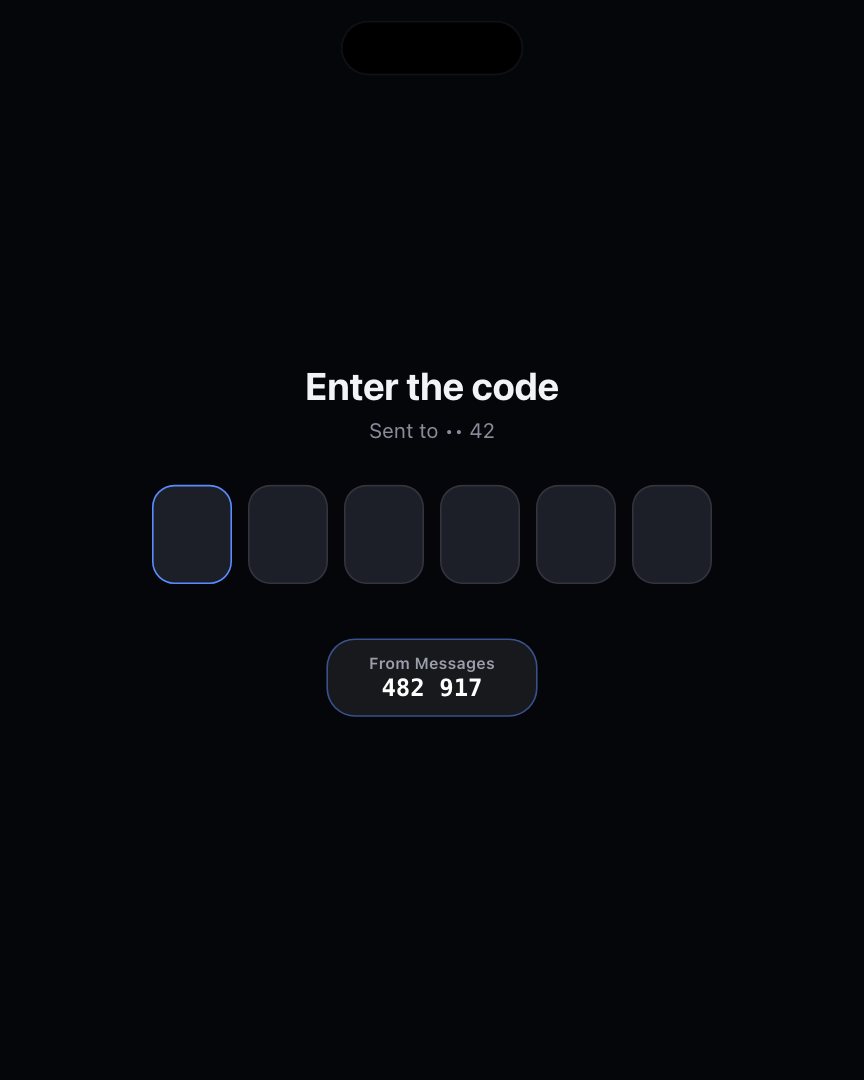
An SMS code field with six boxes that keeps iPhone code autofill working, because under the boxes there is only one real input.
- Codes & PIN
- Free
- spring
- Added Sep 16, 2026
<style>
:root {
  --ink: #0E1116; --slate: #5B6472; --line: #D8DDE5; --cobalt: #2E5BFF; --danger: #E5484D;
  --digits: 6;            /* number of cells, change together with maxlength */
  --cell: 48px; --gap: 10px; --h: 58px;
}
.card {
  box-sizing: border-box; width: min(420px, 92vw); padding: 30px 28px 34px; border-radius: 26px; background: #fff; text-align: center;
  box-shadow: 0 0 0 1px rgba(20,32,56,.06), 0 2px 6px rgba(30,45,70,.06), 0 26px 60px -26px rgba(30,45,70,.32);
}
h1 { margin: 0; font-size: 22px; letter-spacing: -.02em; }
p  { margin: 6px 0 24px; font-size: 14px; color: var(--slate); }

.otp { position: relative; width: calc(var(--cell) * var(--digits) + var(--gap) * (var(--digits) - 1)); height: var(--h); margin: 0 auto; }

/* the only real input, transparent, sits on top of the cells */
.otp input {
  position: absolute; inset: 0; width: 100%; height: 100%; z-index: 2;
  border: 0; outline: 0; background: transparent; color: transparent; caret-color: transparent;
  font-size: 16px; /* below 16px iOS zooms the page */
}

.cells { position: absolute; inset: 0; display: flex; gap: var(--gap); transition: gap .45s cubic-bezier(.6,0,.2,1); }
.cell {
  flex: 1; display: grid; place-items: center; border: 1.5px solid var(--line); border-radius: 12px; background: #fff;
  font-size: 25px; font-weight: 600; transition: border-color .15s, box-shadow .15s, border-radius .45s, transform .2s;
}
.cell.filled { animation: land .26s ease-out; }
@keyframes land { 50% { transform: scale(1.07); } }
.otp:focus-within .cell.active { border-color: var(--cobalt); box-shadow: 0 0 0 4px rgba(46,91,255,.14); }
.otp:focus-within .cell.active:empty::after {
  content: ""; width: 2px; height: 24px; border-radius: 1px; background: var(--cobalt); animation: blink 1s steps(1) infinite;
}
@keyframes blink { 50% { opacity: 0; } }

/* cells merge into a pill */
.otp[data-state="checking"] .cells, .otp[data-state="done"] .cells { gap: 0; }
.otp[data-state="checking"] .cell, .otp[data-state="done"] .cell { border-radius: 0; border-left-color: transparent; border-right-color: transparent; }
.otp[data-state="checking"] .cell:first-child, .otp[data-state="done"] .cell:first-child { border-radius: 29px 0 0 29px; border-left-color: var(--line); }
.otp[data-state="checking"] .cell:last-child,  .otp[data-state="done"] .cell:last-child  { border-radius: 0 29px 29px 0; border-right-color: var(--line); }
.otp[data-state="checking"] input, .otp[data-state="done"] input { pointer-events: none; }

.pill {
  position: absolute; inset: 0; border-radius: 29px; z-index: 3; display: flex; align-items: center; justify-content: center; gap: 8px;
  color: #fff; font-size: 18px; font-weight: 650; background: linear-gradient(180deg, #4A74FF, #2A55F5);
  box-shadow: inset 0 1px 0 rgba(255,255,255,.28), 0 18px 36px -16px rgba(46,91,255,.6);
  clip-path: inset(0 50% round 29px); opacity: 0; cursor: pointer; border: 0; font-family: inherit;
  transition: clip-path .55s cubic-bezier(.6,0,.2,1), opacity .01s .54s;
}
.pill svg path { stroke-dasharray: 20; stroke-dashoffset: 20; transition: stroke-dashoffset .35s .45s; }
.otp[data-state="done"] .pill { clip-path: inset(0 0 round 29px); opacity: 1; transition: clip-path .55s cubic-bezier(.6,0,.2,1); }
.otp[data-state="done"] .pill svg path { stroke-dashoffset: 0; }

.otp[data-state="error"] .cell { border-color: var(--danger); }
.otp[data-state="error"] .cells { animation: shake .36s; }
@keyframes shake { 20%, 60% { transform: translateX(-6px); } 40%, 80% { transform: translateX(6px); } }

.hint { margin-top: 18px; font-size: 13px; color: var(--slate); min-height: 18px; }
</style>

<form class="card" id="form" novalidate>
  <h1>Check your messages</h1>
  <p>We sent a 6-digit code to •• 42</p>

  <div class="otp" id="otp" data-state="idle">
    <input id="code" name="code" type="text"
           inputmode="numeric" autocomplete="one-time-code"
           maxlength="6" pattern="\d{6}" required
           aria-label="6-digit code from SMS">
    <div class="cells" id="cells" aria-hidden="true"></div>
    <button type="button" class="pill" id="pill" tabindex="-1">
      <svg width="20" height="20" viewBox="0 0 20 20"><path d="M4.5 10.4 8.4 14.2 15.8 6.2" fill="none" stroke="#fff" stroke-width="2.4" stroke-linecap="round" stroke-linejoin="round"/></svg>
      Verified
    </button>
  </div>
  <div class="hint" id="hint">Paste works too. Try 000000 to see an error.</div>
</form>

<script>
const input = document.getElementById('code');
const otp = document.getElementById('otp');
const cellsBox = document.getElementById('cells');
const hint = document.getElementById('hint');
const N = input.maxLength;

const cells = Array.from({ length: N }, () => cellsBox.appendChild(document.createElement('div')));

// spread the value of the single input across the drawn cells
function paint() {
  const v = input.value;
  cells.forEach((c, i) => {
    const was = c.textContent;
    c.className = 'cell';
    c.textContent = v[i] || '';
    if (v[i] && was !== v[i]) c.classList.add('filled');
    if (i === Math.min(v.length, N - 1)) c.classList.add('active');
  });
}

input.addEventListener('input', () => {
  input.value = input.value.replace(/\D/g, '').slice(0, N);
  if (otp.dataset.state === 'error') { otp.dataset.state = 'idle'; hint.textContent = ''; }
  paint();
  if (input.value.length === N) verify(input.value);
});
// pasting "482 917" or a whole SMS, maxlength would cut the string before we pick out the digits
input.addEventListener('paste', e => {
  e.preventDefault();
  input.value = (e.clipboardData.getData('text').match(/\d/g) || []).join('').slice(0, N);
  input.dispatchEvent(new Event('input'));
});
// caret always stays at the end so cells fill in order
input.addEventListener('select', () => input.setSelectionRange(input.value.length, input.value.length));

// fake server, any code works except 000000
async function verify(code) {
  otp.dataset.state = 'checking';
  input.blur();
  await new Promise(r => setTimeout(r, 450));
  if (code === '000000') {
    otp.dataset.state = 'error';
    hint.textContent = 'That code didn’t work. Try again.';
    input.value = ''; paint(); input.focus();
    return;
  }
  otp.dataset.state = 'done';
  hint.textContent = '';
}

// clicking Verified resets the demo
document.getElementById('pill').addEventListener('click', () => {
  otp.dataset.state = 'idle'; input.value = ''; paint(); input.focus();
});
document.getElementById('form').addEventListener('submit', e => e.preventDefault());

// Android Chrome, WebOTP reads an SMS like "Your code is 482917\n\n@your-site.com #482917"
if ('OTPCredential' in window) {
  const ac = new AbortController();
  navigator.credentials.get({ otp: { transport: ['sms'] }, signal: ac.signal })
    .then(({ code }) => { input.value = code; input.dispatchEvent(new Event('input')); })
    .catch(() => {});
  document.getElementById('form').addEventListener('submit', () => ac.abort());
}

paint();
input.focus();
</script>
Type or paste any 6 digits. 000000 shows the error state.
What you can change
Change a number, save, and reload the page to see the difference.
maxlength6Number of digits. Change it together with pattern and --digits, for example all three to 4.
--digits6Number of drawn boxes, in the CSS at the top.
Add it to your site
Put it inside your verification screen.
CSS
Paste into your stylesheet, or inside a <style> tag in <head>.
:root {
  --ink: #0E1116; --slate: #5B6472; --line: #D8DDE5; --cobalt: #2E5BFF; --danger: #E5484D;
  --digits: 6;            /* number of cells, change together with maxlength */
  --cell: 48px; --gap: 10px; --h: 58px;
}
.card {
  box-sizing: border-box; width: min(420px, 92vw); padding: 30px 28px 34px; border-radius: 26px; background: #fff; text-align: center;
  box-shadow: 0 0 0 1px rgba(20,32,56,.06), 0 2px 6px rgba(30,45,70,.06), 0 26px 60px -26px rgba(30,45,70,.32);
}
h1 { margin: 0; font-size: 22px; letter-spacing: -.02em; }
p  { margin: 6px 0 24px; font-size: 14px; color: var(--slate); }

.otp { position: relative; width: calc(var(--cell) * var(--digits) + var(--gap) * (var(--digits) - 1)); height: var(--h); margin: 0 auto; }

/* the only real input, transparent, sits on top of the cells */
.otp input {
  position: absolute; inset: 0; width: 100%; height: 100%; z-index: 2;
  border: 0; outline: 0; background: transparent; color: transparent; caret-color: transparent;
  font-size: 16px; /* below 16px iOS zooms the page */
}

.cells { position: absolute; inset: 0; display: flex; gap: var(--gap); transition: gap .45s cubic-bezier(.6,0,.2,1); }
.cell {
  flex: 1; display: grid; place-items: center; border: 1.5px solid var(--line); border-radius: 12px; background: #fff;
  font-size: 25px; font-weight: 600; transition: border-color .15s, box-shadow .15s, border-radius .45s, transform .2s;
}
.cell.filled { animation: land .26s ease-out; }
@keyframes land { 50% { transform: scale(1.07); } }
.otp:focus-within .cell.active { border-color: var(--cobalt); box-shadow: 0 0 0 4px rgba(46,91,255,.14); }
.otp:focus-within .cell.active:empty::after {
  content: ""; width: 2px; height: 24px; border-radius: 1px; background: var(--cobalt); animation: blink 1s steps(1) infinite;
}
@keyframes blink { 50% { opacity: 0; } }

/* cells merge into a pill */
.otp[data-state="checking"] .cells, .otp[data-state="done"] .cells { gap: 0; }
.otp[data-state="checking"] .cell, .otp[data-state="done"] .cell { border-radius: 0; border-left-color: transparent; border-right-color: transparent; }
.otp[data-state="checking"] .cell:first-child, .otp[data-state="done"] .cell:first-child { border-radius: 29px 0 0 29px; border-left-color: var(--line); }
.otp[data-state="checking"] .cell:last-child,  .otp[data-state="done"] .cell:last-child  { border-radius: 0 29px 29px 0; border-right-color: var(--line); }
.otp[data-state="checking"] input, .otp[data-state="done"] input { pointer-events: none; }

.pill {
  position: absolute; inset: 0; border-radius: 29px; z-index: 3; display: flex; align-items: center; justify-content: center; gap: 8px;
  color: #fff; font-size: 18px; font-weight: 650; background: linear-gradient(180deg, #4A74FF, #2A55F5);
  box-shadow: inset 0 1px 0 rgba(255,255,255,.28), 0 18px 36px -16px rgba(46,91,255,.6);
  clip-path: inset(0 50% round 29px); opacity: 0; cursor: pointer; border: 0; font-family: inherit;
  transition: clip-path .55s cubic-bezier(.6,0,.2,1), opacity .01s .54s;
}
.pill svg path { stroke-dasharray: 20; stroke-dashoffset: 20; transition: stroke-dashoffset .35s .45s; }
.otp[data-state="done"] .pill { clip-path: inset(0 0 round 29px); opacity: 1; transition: clip-path .55s cubic-bezier(.6,0,.2,1); }
.otp[data-state="done"] .pill svg path { stroke-dashoffset: 0; }

.otp[data-state="error"] .cell { border-color: var(--danger); }
.otp[data-state="error"] .cells { animation: shake .36s; }
@keyframes shake { 20%, 60% { transform: translateX(-6px); } 40%, 80% { transform: translateX(6px); } }

.hint { margin-top: 18px; font-size: 13px; color: var(--slate); min-height: 18px; }
HTML
Put it where the effect should appear on your page.
<form class="card" id="form" novalidate>
  <h1>Check your messages</h1>
  <p>We sent a 6-digit code to •• 42</p>

  <div class="otp" id="otp" data-state="idle">
    <input id="code" name="code" type="text"
           inputmode="numeric" autocomplete="one-time-code"
           maxlength="6" pattern="\d{6}" required
           aria-label="6-digit code from SMS">
    <div class="cells" id="cells" aria-hidden="true"></div>
    <button type="button" class="pill" id="pill" tabindex="-1">
      <svg width="20" height="20" viewBox="0 0 20 20"><path d="M4.5 10.4 8.4 14.2 15.8 6.2" fill="none" stroke="#fff" stroke-width="2.4" stroke-linecap="round" stroke-linejoin="round"/></svg>
      Verified
    </button>
  </div>
  <div class="hint" id="hint">Paste works too. Try 000000 to see an error.</div>
</form>
JavaScript
Paste right before the closing </body> tag, inside <script></script>.
const input = document.getElementById('code');
const otp = document.getElementById('otp');
const cellsBox = document.getElementById('cells');
const hint = document.getElementById('hint');
const N = input.maxLength;

const cells = Array.from({ length: N }, () => cellsBox.appendChild(document.createElement('div')));

// spread the value of the single input across the drawn cells
function paint() {
  const v = input.value;
  cells.forEach((c, i) => {
    const was = c.textContent;
    c.className = 'cell';
    c.textContent = v[i] || '';
    if (v[i] && was !== v[i]) c.classList.add('filled');
    if (i === Math.min(v.length, N - 1)) c.classList.add('active');
  });
}

input.addEventListener('input', () => {
  input.value = input.value.replace(/\D/g, '').slice(0, N);
  if (otp.dataset.state === 'error') { otp.dataset.state = 'idle'; hint.textContent = ''; }
  paint();
  if (input.value.length === N) verify(input.value);
});
// pasting "482 917" or a whole SMS, maxlength would cut the string before we pick out the digits
input.addEventListener('paste', e => {
  e.preventDefault();
  input.value = (e.clipboardData.getData('text').match(/\d/g) || []).join('').slice(0, N);
  input.dispatchEvent(new Event('input'));
});
// caret always stays at the end so cells fill in order
input.addEventListener('select', () => input.setSelectionRange(input.value.length, input.value.length));

// fake server, any code works except 000000
async function verify(code) {
  otp.dataset.state = 'checking';
  input.blur();
  await new Promise(r => setTimeout(r, 450));
  if (code === '000000') {
    otp.dataset.state = 'error';
    hint.textContent = 'That code didn’t work. Try again.';
    input.value = ''; paint(); input.focus();
    return;
  }
  otp.dataset.state = 'done';
  hint.textContent = '';
}

// clicking Verified resets the demo
document.getElementById('pill').addEventListener('click', () => {
  otp.dataset.state = 'idle'; input.value = ''; paint(); input.focus();
});
document.getElementById('form').addEventListener('submit', e => e.preventDefault());

// Android Chrome, WebOTP reads an SMS like "Your code is 482917\n\n@your-site.com #482917"
if ('OTPCredential' in window) {
  const ac = new AbortController();
  navigator.credentials.get({ otp: { transport: ['sms'] }, signal: ac.signal })
    .then(({ code }) => { input.value = code; input.dispatchEvent(new Event('input')); })
    .catch(() => {});
  document.getElementById('form').addEventListener('submit', () => ac.abort());
}

paint();
input.focus();
Connect it to your backend
Find fake server in the script and replace it with a request to your API.
Good to know
- iPhone autofill works as is. The Android part (WebOTP) needs HTTPS and the SMS format shown in the script comments.
Tilda, Webflow, WordPress
Press Copy all code at the top and paste it into one HTML block.
Add block, Other, T123 HTML code. Paste and save. Check the published page, the editor preview does not run scripts.
Add panel, Embed. Paste, then Save & Close. Custom code runs on the published site.
Add block, Custom HTML. Paste and press Update.